Work

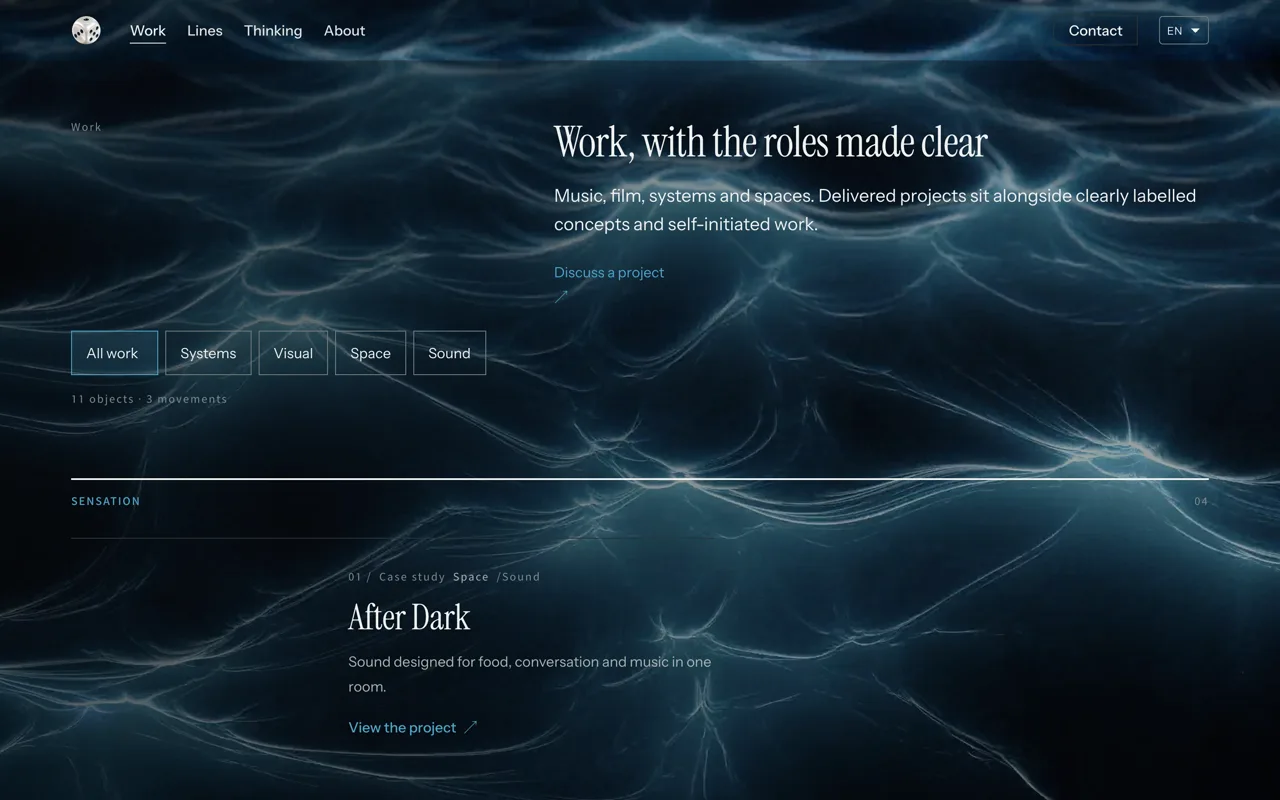
The work index: filters, sections and a project row.
The work indexScreenshot of the live site

Horace Tong

Portfolio as a Marketing System

2026

This website · Systems, visual direction and marketing

Self-initiated · Hong Kong, Hong Kong

Systems

HT.SYS.2026.004Archive plate

Case study

Systems

Made as Self-initiated

My role Portfolio direction, information architecture, visitor journeys, visual direction and build.

In brief

The challenge
People arrive from Instagram, from search, from a forwarded link, or straight onto one project page. Each of them needs to know where they are and what else is here. The work keeps growing as well, and a list of projects stops explaining itself after the first few.
My role
Portfolio direction, information architecture, visitor journeys, visual direction and build.
What changed
The site holds a catalogue of work, a case structure that repeats, projects that contain series, two languages, inline explanations for professional terms, and a small publishing system behind it. Every project states its context, role, difficulty, direction, outcome and credits in the same order, so a reader who has learned one case can read the next without relearning the site.
Result
A visitor can reach relevant work from any entry point, understand a project's thinking without leaving the page, and learn the terminology as they move through the site. Behaviour data shows which projects hold attention and which pages visitors leave early, and the structure changes in response.

Discuss a project

The journey, in five beats

  1. Discovery

    People arrive from Instagram, from a search result, from a link someone forwarded, or straight onto one project. Every entry point says enough for a reader to know where they are and what else is here.

  2. Orientation

    The work is kept in four lines, sound, visual, systems and space, and every project says which line it belongs to and what sits beside it.

  3. Depth

    A project carries the situation, the part I owned, the decision behind it and what it became. Enough to follow the thinking, and it stops there.

  4. Action

    A next step stays available while someone is still deciding: another project, another line, the work itself, or a conversation. Taking it does not end the visit.

  5. Learning

    Which projects hold attention, where visitors leave early, and which entry points are actually used. Anonymous patterns, read together, to see where the structure can be clearer.

Context

This site was designed as more than a place to display work. It brings together project structure, landing-page thinking, visitor journeys, behavioural data and clear next steps, so different people can understand the work and find what is relevant to them. The aim is not to control how someone browses. It is to design an environment where the next useful decision is easier to make.

Problem

People arrive from Instagram, from search, from a forwarded link, or straight onto one project page. Each of them needs to know where they are and what else is here. The work keeps growing as well, and a list of projects stops explaining itself after the first few.

Thinking

What a visitor needs first is not more work but a clearer sense of where they are. The structure is doing its job when the next useful decision is easier to make.

System

The work was treated as one system rather than as a set of pages. The question was not how each page should look, but what a reader needs at each point: enough to know where they are, enough to understand a piece of work, and an obvious way onward. Depth is deliberately uneven. A reader who is deciding gets four answers within a minute; a reader who is studying the site can keep going for much longer. That was the main structural decision, one catalogue at two speeds, with no dead ends.

Decisions

Three choices follow from that. The journey is designed as a route a visitor may take, not a path they must follow. Professional terms are explained where they appear, rather than collected on a separate page. Interaction data is used to improve the structure, never to steer one person.

Execution

The site holds a catalogue of work, a case structure that repeats, projects that contain series, two languages, inline explanations for professional terms, and a small publishing system behind it. Every project states its context, role, difficulty, direction, outcome and credits in the same order, so a reader who has learned one case can read the next without relearning the site.

Result

A visitor can reach relevant work from any entry point, understand a project's thinking without leaving the page, and learn the terminology as they move through the site. Behaviour data shows which projects hold attention and which pages visitors leave early, and the structure changes in response.

How the site is built around the visitor

01

Discovery

Any page has to be able to work as a front door. A reader can arrive on one project from a shared link or a search result without ever seeing the home page, and still needs to know what this is. So every project opens with the same short plaque in the same order: what it is, the year, what I owned, and one link to the work itself. Somebody who lands anywhere can tell where they are within a few lines, without walking back to the start.

02

Orientation

The work sits in four lines, and a project belongs to the line that best explains it. Nothing is filed twice to make a menu look fuller, and a reader can always see what is nearby, so a project is never a page with nowhere to go next.

03

Landing pages

A landing page is a page built around one clear purpose. Several pages here do that job. The home page is for orientation, a line page is for browsing that kind of work, a project page is for one decision, a service page is for how we would work together. Each one has to be clear about why it exists, rather than every page having to end in a transaction.

Landing page

A page built around one clear purpose, so someone arriving on it for the first time knows what it is for.

04

Visitor journey

The path is a route a reader may take, not one they have to follow. Nothing is gated and nothing expires, so projects, lines and pages can be crossed in any order, and the useful next steps are simply visible along the way.

05

Depth

A reader should be able to get from seeing the work to understanding it without leaving the page: what the situation was, what I was responsible for, why certain decisions were made, what was handed over, and what changed. Not every step of the internal work, only enough for the work to be understandable.

06

Information architecture

Information architecture is how information is arranged, so a reader can tell where they are and where to go next. Here that means four lines, projects that can hold a series, case studies, credits, related work and the types of project, arranged so a growing body of work stays readable instead of turning into a pile.

Information architecture

How information is arranged, so a reader can tell where they are and where they can go next.

07

Content system

Every project page follows the same order: context, role, challenge, direction, outcome, credits, related work. A reader who has understood one case can read the next without relearning the page, which matters more as the archive grows.

08

Explaining the work

Professional words are explained where they appear, next to the thing they describe, rather than collected on a separate page nobody visits. Art direction arrives with a plain sentence sitting under it. A reader learns the terminology as they move through the site, and nothing interrupts the reading.

09

Journey, not funnel

The order a page is read in follows a path rather than a funnel: discovery, interest, understanding, evidence, trust, and then a step if somebody wants one. A funnel narrows the options whether the reader is ready or not. Here the choice stays with the reader, and the page simply keeps the options visible.

10

Clear next steps

At any point a reader can open another relevant project, move to another line, go deeper into a case, visit the work where it is published, or start a conversation. The next step is offered early enough to be there while the decision is still fresh, and it never interrupts what is being read.

11

Behavioural learning

The site records anonymous interaction: which pages are opened, how far they are read, how long visitors stay on them, which next steps are taken, whether a case is read to the end, which lines are explored, and mobile against desktop usage. The purpose is to see where the experience can be clearer, never to follow one person. The patterns are read together, and early on there is deliberately nothing to conclude from them.

Behavioural learning

Reading anonymous patterns of use, such as which pages are left early, to see where an experience can be made clearer.

12

Learning

The structure is meant to change. New work, a clearer label, and a section that turns out not to be read are all things the site is built to absorb, so the arrangement can move without the whole site being rebuilt. Design, observe, refine, design again.

13

The system behind the site

What sits behind the page matters less than what it makes possible. Projects can be reordered, a project can contain a series, both languages are written and published together, a project can be held back or released, and each case declares what it is part of. The technology is the plumbing. The question it answers is how a growing archive stays understandable.

Source
  • The site is live and can be visited. Owner record of its design and build.

    2026-09-25

The portfolio is built to keep learning. New work and clearer patterns change the structure without a rebuild. Design, observe, refine, design again.

  • Project ownership

    Horace Tong

    Self-initiated

  • Creative ownership

    Horace Tong

    Creative ownership

    • Strategy
    • Information architecture
    • User experience
    • Visual direction
    • Content system
    • Development
    • Marketing systems

Photographs shown here are selected from the project archive and are not necessarily photographed by the author.

A few practical questions

Do I need to rebuild my whole website?

Not necessarily. What a visitor needs is often a clearer arrangement rather than a new surface: which pages exist, what each one is for, how a project is read, and where a reader can go next. If the arrangement is the problem, a rebuild on its own does not fix it.

What if I already work with a designer or a developer?

The work can sit alongside an existing team. Structure, information architecture, visitor journeys and the content system can be decided before or separately from implementation, and handed over in a form whoever builds it can use.

What if I don't know what the website needs yet?

That is usually part of the work rather than a reason to wait. The first stage can be spent on the audience, the information, the priorities and the journey before anything is built, and that stage is a smaller commitment than the build itself.

Is this design or marketing?

Both are involved, and neither is the subject. The subject is what a reader does: where they arrive, what they understand, and which decision they make next. Visual direction and marketing structure are two ways of answering that.

Where this transfers

A portfolio is a marketing system, not a gallery: positioning first, then the path a visitor takes through it. The same method works for any offer that has to be understood quickly.

Have a related project?

Tell me what you want to make. This project will be included as a reference.